
📝 After completing this theory chapter, you should be able to:
- Explain how interpreted, compiled and hybrid languages work and differ from eachother
- Describe how Java is cross-platform and how it tries to combine benefits of strictly interpreted and compiled langauges
- Describe what Maven is and how it works in general for Java projects
- Explain what different parts of a pom.xml file do in relation to Maven
- Describe what the commands mvn compile, mvn test and mvn package do and how/when they are integrated into a GitHub Actions workflow
- Explain what a
.classfile and a.jarfile is - Explain what a unit test is and what its role is
- Explain a given Java unit test
- Explain a given GitHub Actions workflow file
- Create a GitHub Actions workflow file when given the needed steps, commands, actions, ...
The Build step: Building code into executables... or not
Have you ever wondered what happens when you press the green Run button in PyCharm, IntelliJ or Visual Studio? Your code runs, yes, but what does that actually mean behind the scenes?

As we go through the diverse landscape of programming languages, we encounter a key distinction when it comes to running code:
- compiled programming languages: In these languages, such as C# or C++, a Build step is necessary to translate the source code into executable machine code. This code can then be directly executed by the computer.
- interpreted programming languages: Unlike compiled languages, interpreted languages like Python do not require a Build step. Instead, the source code is executed line by line by an interpreter when you run it, in other words 'at runtime'.
In the DevOps lifecycle as an infinite loop, we also have yet to talk about this "Build" step.
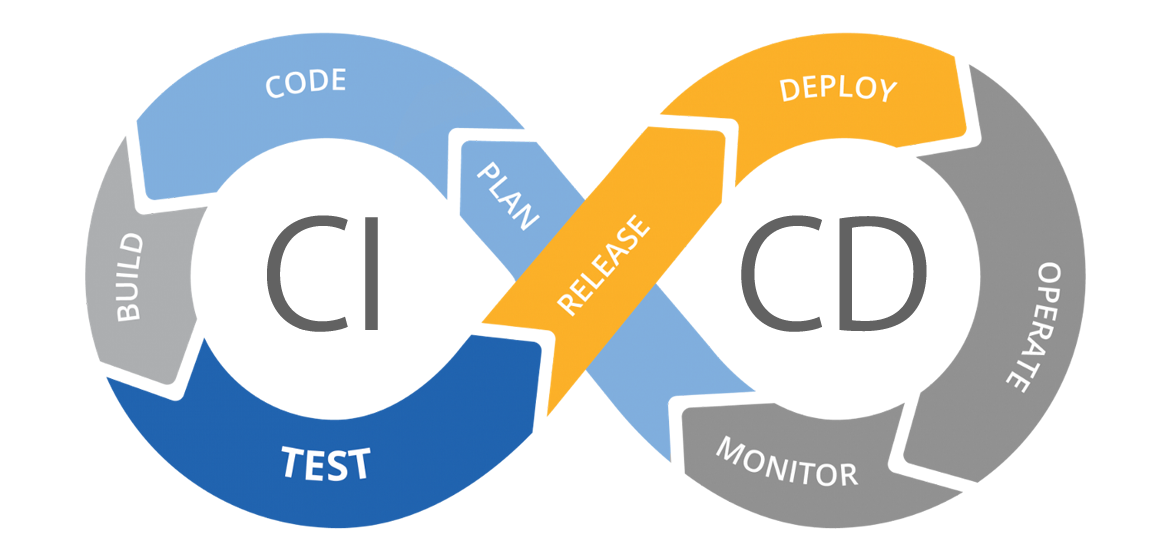
In summary, the necessity for a Build step when wanting to run your program depends on the type of programming language being used: compiled languages require it to generate executable code, while interpreted languages do not.
As such these represent different approaches to translating code into machine instructions, each with its own strengths and considerations. In this chapter, we'll explore the differences between these compiled and interpreted languages and understanding how they shape the software development process.
📝 Interpreted languages (no build needed)
In the realm of interpreted languages, let's consider 🐍 Python as our guiding example.
A little bit of humour to start off, from Interview with a Postdoc, Junior Python Developer:
When you start working with Python for the first time you will be instructed to install Python itself. Contained in this install is the Python interpreter.
When Python code is run the interpreter looks at and parses the source code line by line, converting each instruction into machine-readable instructions on-the-fly, which is understandable by the underlying hardware.

As the interpreter progresses through the code, it evaluates expressions, executes statements, and handles control flow in real-time. This approach enables immediate feedback and allows developers to observe the effects of their code as it unfolds. This makes interpreted languages quick to work with as there is no step between coding and the interpreter being able to use the code, but slower overall to be executed as the interpreter works line by line.
The interpreter's ability to interact with the code also opens enables runtime features such as dynamic typing. Dynamic typing in Python allows variables to change types dynamically during execution, providing flexibility but requiring careful consideration to avoid potential bugs.
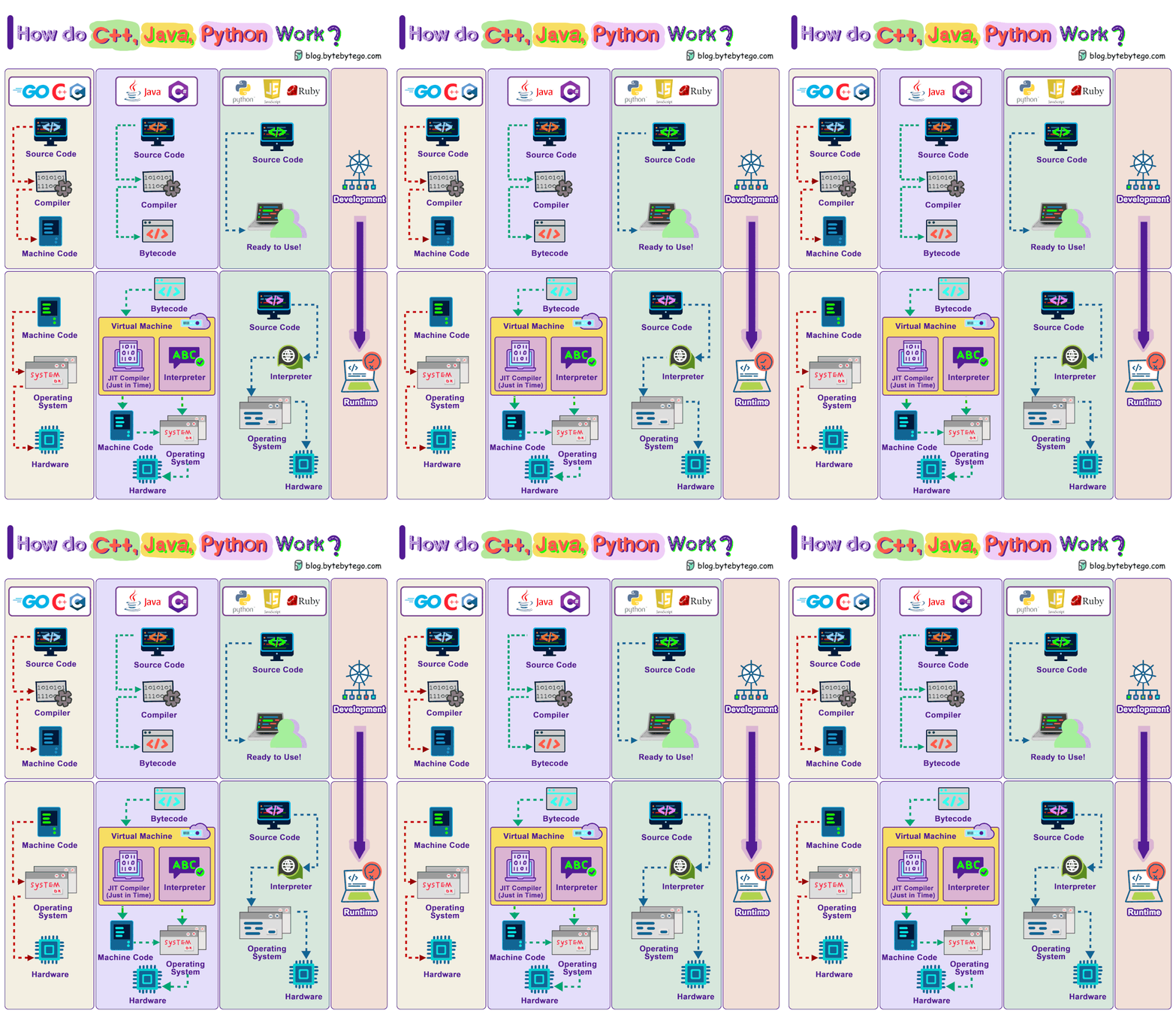
Other aspects of interpreted languages are:
| Aspect | 📝 Interpreted Languages |
|---|---|
| Execution speed ⚡ | The interpreter has to read and execute the code line by line. |
| Memory usage 💾 | The interpreter needs to store the source code and intermediate results. |
| Error detection 🔎 | The errors are only detected at runtime. |
Looking at these more in detail:
- Execution speed ⚡: In the world of interpreted languages, speed takes a step back. The interpreter reads and executes the code line by line, introducing a layer of sequential processing. This method may result in slower execution compared to the optimized and pre-compiled nature of other languages.
- Memory usage 💾: Memory usage in interpreted languages leans towards the heavier side. The interpreter not only needs to store the source code but also keeps track of intermediate results during runtime. This characteristic may lead to higher memory consumption compared to languages that compile code before execution.
- Error detection 🔎: Error detection in interpreted languages unfolds during runtime. As the interpreter processes each line, it identifies and reports errors encountered along the way. This approach contrasts with compiled languages, where errors are often discovered during the compilation phase, before running the code or program.
🗜️ Compiled languages (build is needed)
!{class="u-right-brand"}For compiled languages, let's consider C as our guiding example. Read through the introduction page of the language by Microsoft.
Before a C program can be run, the source code needs to be transformed into an executable file (also called a binary) like an .exe file. This process is done by a compiler and is called compilation, converting human-readable code into machine-readable instructions.
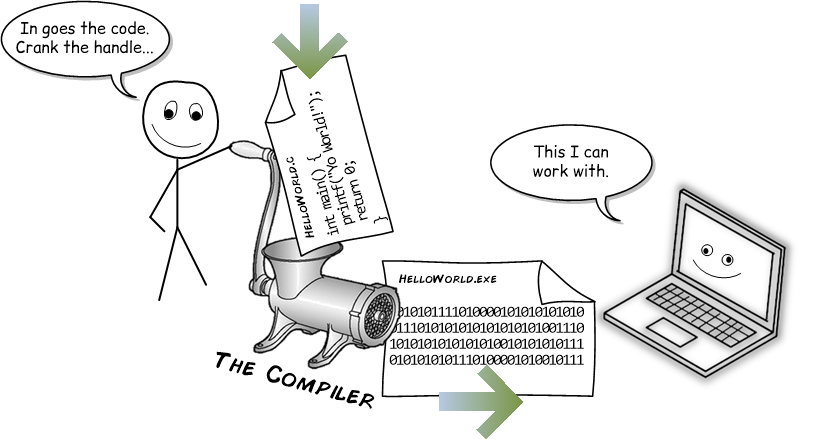
This compilation phase produces an executable file containing machine code, ready to be executed by the target hardware. This refers to the specific set of hardware components for which a piece of software is compiled to run. This includes the central processing unit (CPU), memory, and peripheral devices that are compatible with the software's compiled machine code.
This means that code compiled for one type of target hardware will not work on a different target hardware. A classic problem where a compiled executable for Windows will not run on Linux or Mac unless you install additional compatibility tools or use a VM.
All of this causes compiled languages to differ from interpreted languages:
| Aspect | 📝 Interpreted Languages | 🗜️ Compiled Languages |
|---|---|---|
| Execution speed ⚡ | The interpreter has to read and execute the code line by line. | Faster, as the compiled code is already translated into machine code before running. |
| Memory usage 💾 | The interpreter needs to store the source code and intermediate results. | Lower, as the compiled code is optimized for system resources. |
| Error detection 🔎 | The errors are only detected at runtime. | Earlier, as the errors are detected at compile time. |
Looking at these more in detail:
- Execution speed ⚡: Compiled languages boast exceptional execution speed. With code already translated into machine-readable instructions during the compilation phase, compiled programs bypass the need for line-by-line interpretation, resulting in swift and efficient execution. This efficiency is particularly noticeable in performance-critical applications where speed is important.
- Memory usage 💾: Memory usage in compiled languages tends to be lower. During the compilation process, the code is optimized for system resources, resulting in efficient memory allocation and utilization. This optimization contributes to the overall performance and responsiveness of compiled programs, especially in memory-constrained environments.
- Error detection 🔎: (Some) errors are caught during the compilation phase, allowing developers to address them before executing the program. This proactive approach minimizes runtime errors and facilitates smoother debugging, enhancing the reliability and stability of compiled programs.
Got it! Let's edit the example to ensure it ends up with an .exe file.
🔵 An example of C as a compiled language
To illustrate the compilation process with an example, we will use a C application. As you know by now, we will need a compiler to compile the C code into an executable file, in this case into an .exe file.
This compiler called gcc is commonly used and can be installed on various operating systems.
This example is of an application that takes words and capitalizes every letter of the word.
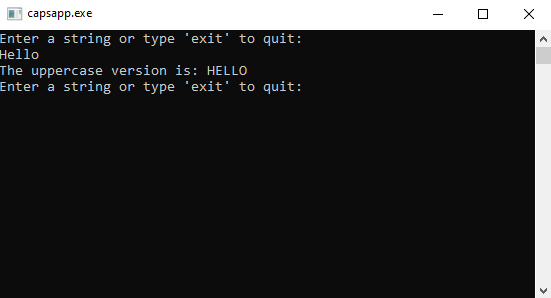
It starts from a file called capsapp.c. These .c files are the source code files of C applications:
#include <stdio.h>
#include <string.h>
#include <ctype.h>

int main() {
    char input[100];
    const char exit[] = "exit";

    while (1) {
        printf("Enter a string or type 'exit' to quit:\n");
        fgets(input, sizeof(input), stdin);
        input[strcspn(input, "\n")] = '\0'; // Remove newline character

        if (strcmp(input, exit) == 0) {
            break;
        }

        for (int i = 0; input[i]; i++) {
            input[i] = toupper(input[i]);
        }

        printf("The uppercase version is: %s\n", input);
    }

    printf("Thank you for using the app. Goodbye!\n");
    return 0;
}
To then compile the code, one would navigate to the folder containing the .c file using a terminal or command prompt and use the gcc compiler to compile the source code into an .exe file. Notice that we directly reference the compiler:
gcc -o capsapp.exe capsapp.cThere will now be a capsapp.exe file located in the same folder as the capsapp.c file. It can be run by double-clicking or from the command line.
🌎 The question of being cross-platform
For a programming language to be considered cross-platform, it means that software developed in that language can be executed on multiple operating systems without needing significant modification. Essentially, a cross-platform language allows developers to write their code once and run it anywhere, whether that’s on Windows, macOS, Linux, or other operating systems.
With interpreted Languages, such as Python and JavaScript, the same source code can be executed on various operating systems without modification, provided that the corresponding interpreter is available. This flexibility is particularly advantageous for developers who aim to create applications that run seamlessly across different environments.
In contrast, most compiled languages like C and C++ prioritize performance over platform independence. The source code is compiled into executable code that is optimized for a specific platform's architecture like Windows or Linux. This optimization results in faster execution on the intended system. However, it also means that the code must be recompiled for each target platform or system, which can be a hindrance to cross-platform development.
🌎 The Hybrid Approach (build is needed)
Java represents a hybrid approach since when it was first released as a programming language. It is both compiled and interpreted, which allows it to maintain a degree of platform independence while also being efficient.
Java code is compiled into bytecode, an intermediate form that is independent of any particular machine architecture. This bytecode is then executed by the Java Virtual Machine (JVM), which interprets it at runtime. As a result, Java applications can run on any device that has a JVM, making it a versatile choice for cross-platform development.
☕ Java being compiled and interpreted:
Compiled:
- The Java compiler (
javac) takes.javasource files and compiles them into bytecode, which is a platform-independent code represented in.classfiles.
- The Java compiler (
Interpreted:
- The Java Virtual Machine (JVM) executes the bytecode. The JVM is a platform-dependent engine that interprets the bytecode into machine code at runtime. This process involves three main stages:
- Class Loading: The JVM loads the
.classfiles into memory. - Bytecode Verification: The JVM verifies the bytecode to ensure it's valid and secure to execute.
- Just-In-Time Compilation: The JVM may optionally compile bytecode into native machine code for performance improvements, a process known as Just-In-Time (JIT) compilation.
- Execution: The native machine code is executed by the host system's CPU.
- Class Loading: The JVM loads the
- The Java Virtual Machine (JVM) executes the bytecode. The JVM is a platform-dependent engine that interprets the bytecode into machine code at runtime. This process involves three main stages:
The key to Java's platform independence lies in the use of an intermediate representation in bytecode for Java and a runtime system called JVM for Java that abstracts away the underlying hardware details. This allows both languages to run on any platform that provides a compatible runtime environment.
For Java, this means that as long as a device has a JVM implementation, Java applications can run on it.
These processes ensure that Java maintains a balance between performance and platform independence, making them versatile choices for developers building applications that need to run across different operating systems.
As a recap you can look at this overview for the three language types we covered.
| Type | Languages |
|---|---|
| Compiled (build is needed) | C 🛠️, C++ ➕, Go 🐹 |
| Hybrid (build is needed) | Java ☕, C# Core 🟣 |
| Interpreted (build is not needed) | Python 🐍, Ruby 💎, JavaScript 📜 |