🕹 Challenges & Exploration
You as a student need to fill in these assignments and learning goals by yourself. At the start of each next chapter the lecturer will, together with class, review these in an overall sense but will not give the full, word-by-word, solution for you to simply sit back and download. So it is important that you have completed the work yourself before the review starts in class and you can correct where needed.
You are not allowed to use AI like ChatGPT or Bing Copilot on the exam, but you are here! Leverage these new tools to speed up and give structure to your notes and documents. For example, ask to put material in Markdown format!
📝 After completing these challenges, you should be able to:
- Describe what GitHub Tags and GitHub Releases are and how they fit in the DevOps Lifecycle.
- Describe how you can create an automated release via GitHub Actions.
- Describe what
pytestis and what it can be used for. - Describe the functionality of given
pytesttests and how they fit under the name of unit tests.
🐸 Releasing with GitHub
Up until now you have seen the Release step of the DevOps Lifecycle as making a container, executable, binary, ... available for download somewhere. But actual users will not go look into a completed pipeline to download your software, if they are even allowed to look at the Actions tab.
Instead you are now going to create an actual Release in Github.
What are tags and releases in GitHub?
First research what Tags and Releases are in Github. You can start from this this link and this link. Describe how they fit in the DevOps Lifecycle. Lastly, study here how you can create both of these manually.
Creating releases on GitHub via GitHub Actions
Now you should integrate it into a workflow pipeline.
Study this article to get the basics of using GitHub Actions to create a Release.
Start from your completed java-console-test repository from the previous page's example. Here you should add a second workflow file to the .github/workflows folder of your repository and call it releaseflow.yml.
Copy the contents of the workflow.yml into it to start. This new workflow should have the same build-and-test and deliver-jar jobs. But aside from that you should edit the following:
- Rename the
name:of the workflow pipeline to something relevant - Replace the
on: push: branches: [ main ]to make it so that this workflow file only runs where there aretags:in the push. Check the article for this. - Add a third job called
release:that takes the artifact from thedeliver-jar:job and creates a release with it using thencipollo/release-actionsimilar to the article.
⚠️
⚠️ The article still uses the version three actions/download-artifact@v3 of the download-artifact action. This version is not available anymore, so use version four actions/download-artifact@v4 instead. Otherwise you get the Error: Missing download info for actions/download-artifact@v3 error, which is happens when you try to use an action that is not available anymore under that name or version.
Just like in the article you should then do a new push with a tag:
git tag -a v0.0.1 -m "Version 0.0.1"git push origin v0.0.1You should end up with your repository looking like this:
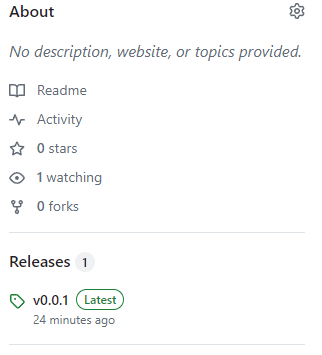
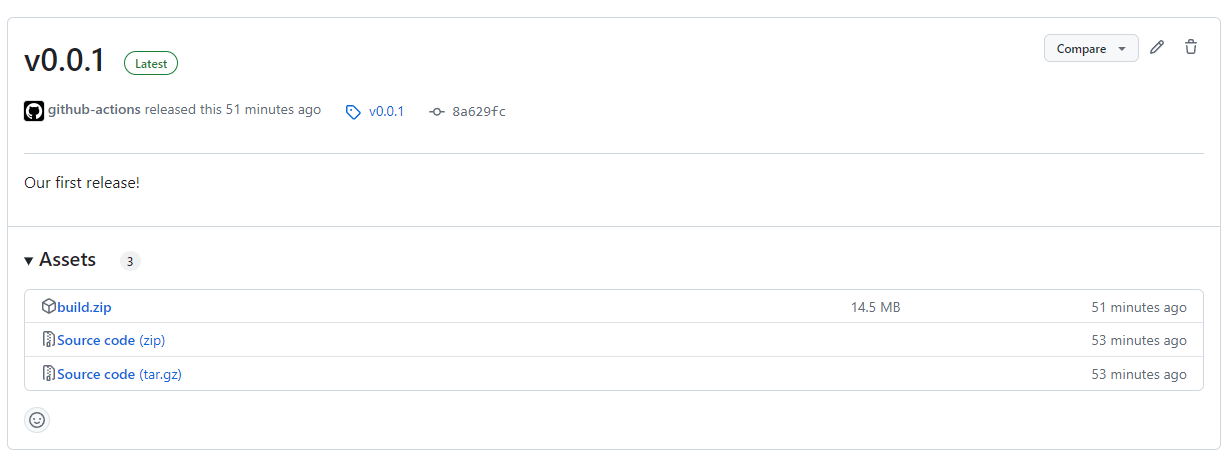
Go to the release and edit the description manually so it matches this:
🧪 Testing with Python
In this chapter you have looked at a Java unit test. Now you are going to create some yourselves by using pytest for Python.
This is a piece of python code should be tested. Open PyCharm and create a new Pure Python project, and edit the main.py file into this:
# main.py

def add(a, b):
    """Function to add two numbers."""
    return a + b

def subtract(a, b):
    """Function to subtract two numbers."""
    return a - b

def divide(a, b):
    """Function to divide two numbers."""
    if b == 0:
        raise ValueError("Cannot divide by zero.")
    return a / b
Of course these methods will be used in a larger calculator application, but for now we will limit ourselves to this.
Open the Terminal in PyCharm and install pytest:
pip install pytestYou should look up how to write a test .py file for this, and how to run it with pytest. This test file should test:
- If the
add()function actually adds two numbers. - If the
substract()function actually substracts two numbers. - If the
divide()function actually divides two numbers. - If the
divide()function actually gives thatValueErrorwhen trying to divide by zero.
When you have made this test .py file, run the tests with pytest.

After you have done this locally on your laptop, upload the folder with the main.py file and the test .py file to a new repository called python-pytest-ex in your GitHub account. Also create a CI workflow that runs the test file with pytest on every push.
Lastly, after you confirmed the tests run well in the GitHub Actions workflow pipeline, make the tests fail by editing the main.py code.